Bir Jsf projenizde Bootstrap 3.3.4 Glyphicons karakterleri düzgün gözükmüyorsa CSS dosyanızı aşağıdaki şekilde düzenleyin. Benim örneğimde fontlarım aşağıdaki resimdeki gibi dizin yapısına sahip.
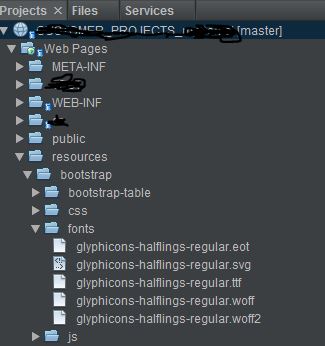
@font-face {
  font-family: 'Glyphicons Halflings';
  src: url("/javax.faces.resource/bootstrap/fonts/glyphicons-halflings-regular.eot.xhtml");
  src: url("/javax.faces.resource/bootstrap/fonts/glyphicons-halflings-regular.eot.xhtml") format('embedded-opentype'), url("/javax.faces.resource/bootstrap/fonts/glyphicons-halflings-regular.woff2.xhtml") format('woff2'), url("/javax.faces.resource/bootstrap/fonts/glyphicons-halflings-regular.woff.xhtml") format('woff'), url("/javax.faces.resource/bootstrap/fonts/glyphicons-halflings-regular.ttf.xhtml") format('truetype'), url("/javax.faces.resource/bootstrap/fonts/glyphicons-halflings-regular.svg.xhtml") format('svg');
}

 Yasin KALAYCI'nın kişisel bloğu
Yorum bırakın